The Main Window
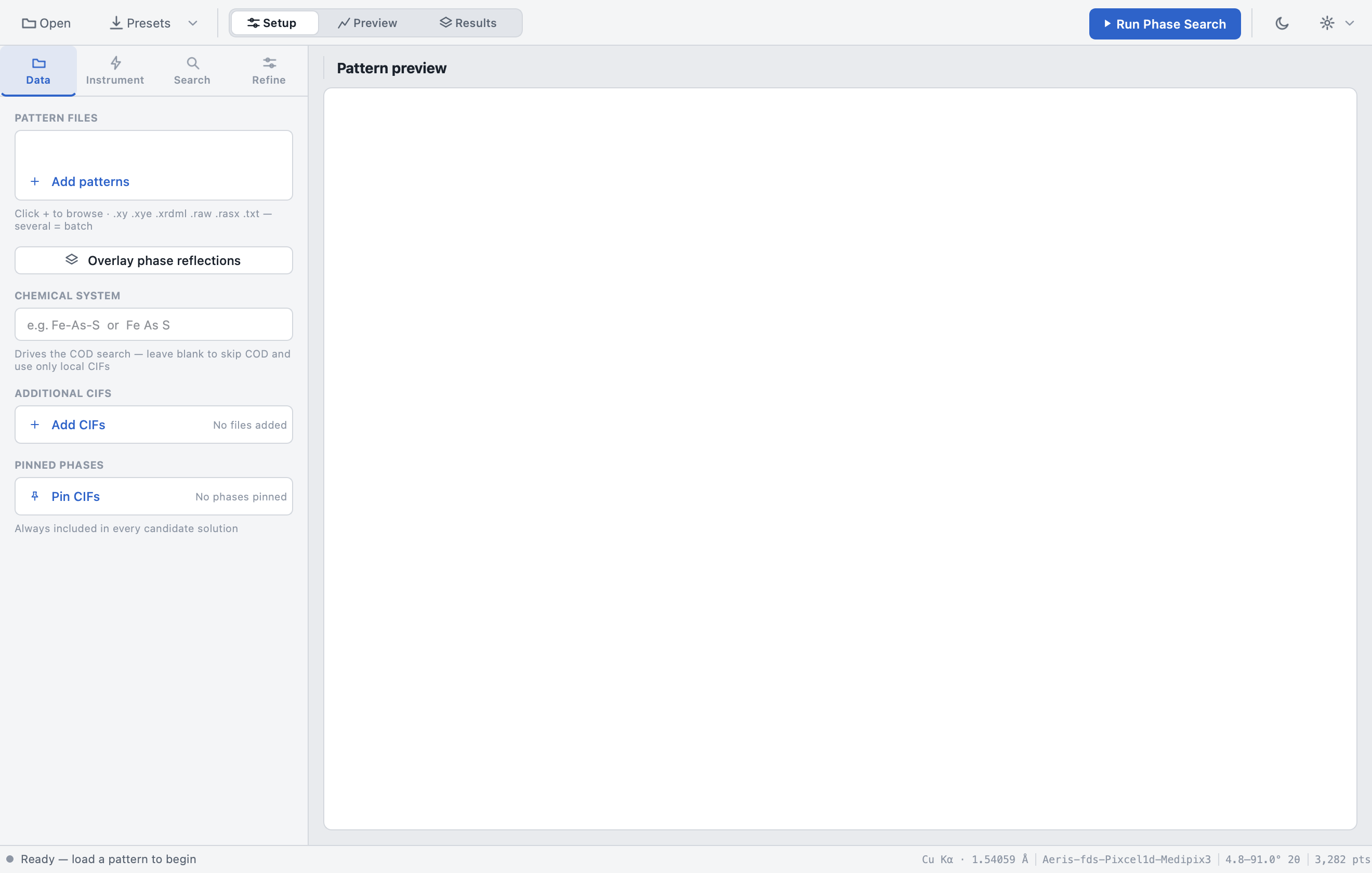
The window has four regions:
| Region | Purpose |
|---|---|
| Toolbar (top) | Open patterns, presets, workspace switcher, Run button, theme & settings |
| Sidebar (left) | All analysis inputs, organized into four tabs: Data · Instrument · Search · Refine |
| Content area (right) | Welcome page → pattern preview → live progress → ranked results |
| Status bar (bottom) | App state (left) and the active instrument setup (right) |
Toolbar

| Control | Action |
|---|---|
| Open | Browse for pattern files (same as File → Open patterns…) |
| Presets ▾ | Apply a saved parameter preset, Save preset…, or delete one. Presets capture the entire sidebar state and are shared with the MCP server. |
| Setup / Preview / Results | The workspace switcher — see below |
| Run Phase Search | Starts the analysis. While running it becomes a red Cancel button. |
| Moon/Sun icon | Cycle to the next theme |
| Gear ▾ | Theme picker and About dialog |
Workspaces
The three-segment switcher controls what the content area shows:
| Workspace | Shows |
|---|---|
| Setup | Sidebar focus + welcome/preview page — configure the run |
| Preview | The live pattern preview with optional background anchors and reflection overlays |
| Results | The ranked solutions view after an analysis |
The switcher follows you automatically — starting a run jumps to the progress page, and finished results land in Results.
Menu bar
| Menu | Items |
|---|---|
| File | Open patterns… · Add CIFs… · Save preset… · Export current solution (Plot data .txt / Interactive plot HTML / Report .txt) · Open .lst output · Quit |
| Edit | Clear additional CIFs · Clear pinned phases |
| View | Theme (Helios — Light Native / Graphite — Dark Instrument / Mineral — Light + Scope) · Workspace (Setup / Preview / Results) |
| Analysis | Run phase search · Refine phases · Overlay phase reflections |
| Tools | Refresh COD cache (clear) |
| Help | About AutoPhaseAnalysis |
Status bar
- Left — a status dot plus a message tracking app state:
Ready — load a pattern to begin→Pattern loaded — ready to run→ progress/error states while running. - Right — the active setup at a glance:
source & wavelength · instrument profile · measured 2θ range · point count,
e.g.
Cu Kα · 1.54059 Å | Aeris-fds-Pixcel1d-Medipix3 | 4.8–91.0° 2θ | 3,282 pts.
Themes
Three built-in themes (View → Theme, the toolbar moon/sun button, or the gear menu):
| Theme | Character |
|---|---|
| Helios | Light, native feel (default) |
| Graphite | Dark instrument console |
| Mineral | Light with a scope accent |
Charts, tables, and all widgets re-style instantly; the choice persists across sessions.
Session persistence
The app remembers your state between launches: the last session (loaded pattern and settings) is restored on startup, the welcome page offers a recent-files list, and saved presets are kept in the OS-native settings store — shared with the MCP server.