Refine Panel
The fourth sidebar tab controls the Rietveld refinement model. It has two modes, switched by the segmented control at the top:
- Quick (default) — sensible defaults, nothing to configure.
- Advanced — exposes every parameter below.
Quick first, Advanced after
Run the phase search in Quick mode. The search Rietveld-refines every candidate combination, so a heavier model slows the whole tree search and gains you nothing while the phases are still unknown. Once the search has identified the phases, switch to Advanced and re-refine the chosen solution with the extra parameters (zero-point, asymmetry, broadening, orientation…) to polish the final fit.
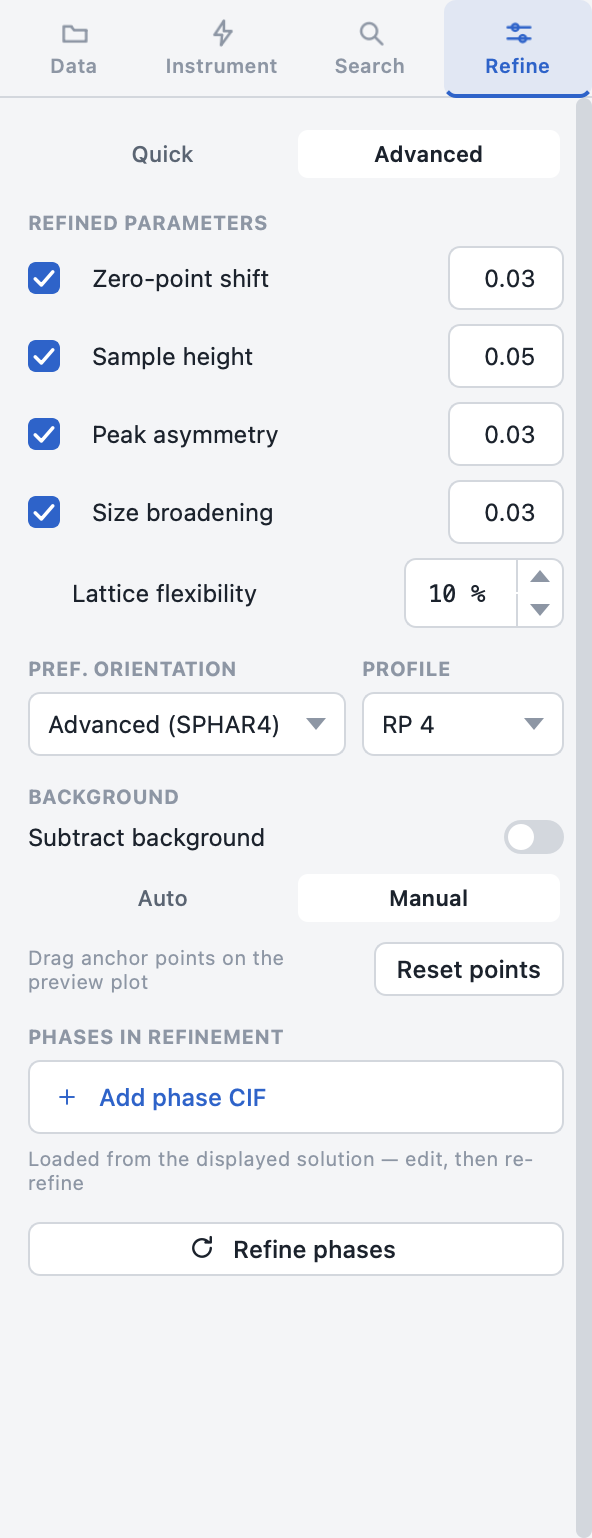
Refined parameters
Each row is a checkbox (refine on/off) plus a ± range field that bounds the parameter during refinement:
| Parameter | BGMN name | Default | Refines |
|---|---|---|---|
| Zero-point shift | EPS1 |
off · ± 0.02 | The 2θ zero-point error of the goniometer |
| Sample height | EPS2 |
on · ± 0.05 | Specimen displacement from the focusing circle |
| Peak asymmetry | k1, k2 |
off · ≤ 0.01 | Low-angle peak asymmetry |
| Size broadening | b1 |
off · ≤ 0.01 | Crystallite-size peak broadening |
Lattice flexibility (0 – 50 %, default 10 %) sets how far each phase's lattice parameters may deviate from its CIF values.
Preferred orientation & profile
| Control | Options |
|---|---|
| Pref. orientation | Off · Basic (SPHAR0) · Advanced (SPHAR4 spherical harmonics) |
| Profile | RP 1 – RP 4 (default RP 4) — the BGMN profile complexity level |
Background
- Subtract background — toggle background handling on/off.
- Auto — an iterative polynomial fit; the Polynomial degree spin box (1 – 12, default 5) controls its flexibility.
- Manual — you place the background yourself by dragging anchor points on the preview plot (see Pattern Preview). Reset points re-seeds the anchors from the auto fit.
Phases in refinement & re-refining
The phase list at the bottom powers the re-refinement workflow:
- Run a phase search and open a solution you like.
- The solution's phases are loaded into this list automatically.
- Edit the list — remove a dubious phase or Add phase CIF — then click Refine phases.
- A single refinement runs with exactly the listed phases (no search), and the result appears as a new solution.
Tip
This is the fastest way to test "what if I drop this minor phase?" or to
refine a known phase assemblage directly — it skips the combinatorial
search entirely. The same operation is exposed as start_refinement on the
MCP server.